Change Your Personal Information
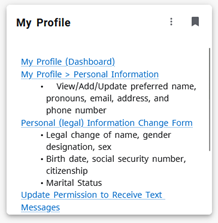
Personal Information includes:
- Legal full name, gender designation, legal sex
- Preferred first name
- Personal Pronouns
- Birthdate, social security number, citizenship
- Marital status
- Home mailing address, telephone number, email
- Options for text messaging communication from SLCC
- Emergency Contact Information
To make updates or corrections to your legal first/middle/last name, social security number, marital status, birthdate, legal sex and/or gender designation, you will be required to fill out the Personal Information Change Form or look for the “My Profile” card in MySLCC.
Preferred Name Information
Any student who uses a name other than their legal name, for any reason, is welcome to add/update the preferred name themselves from the "My Profile" card in MySLCC. Examples of reasons to use a preferred name include:
- Student's legal name is inconsistent with their gender identity
- Student primarily uses their middle name instead of their first name
- Student goes by a nickname different from their first name
- International students or other students who wish to adopt an English language nickname during their course of study
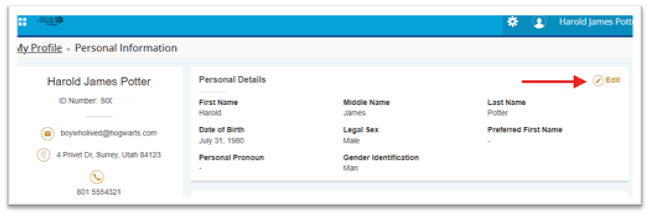
Search for the "My Profile" in MySLCC and click on the link for My Profile > Personal Information
- In the personal details section, click the edit button in the top right-hand corner
- Enter preferred first name and click update
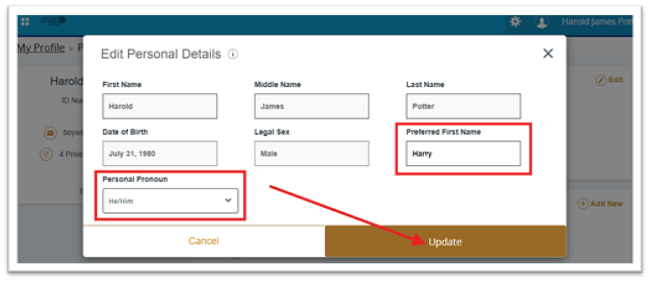
*Legal information fields will be grayed out because they require a formal request with documentation to update
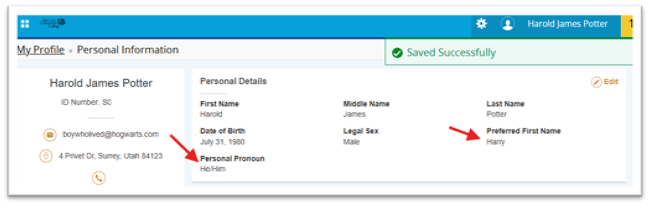
Once your preferred name change request is approved, your preferred name will appear in the following places:
- Canvas
- MySuccess
Please note the following:
- All official College correspondence will use your legal name.
- The preferred first name is used solely for SLCC’s internal systems where applicable. Official transcripts, enrollment verifications, diplomas, third party database systems, and all external communications, such as hometown newspapers (dean’s list announcements), etc., will continue to use your legal name.
Disclaimer: This procedure does not form a contract of any kind and may be modified, changed, altered, or rescinded at the discretion of Salt Lake Community College. Inappropriate use of the preferred name, including but not limited to, misrepresentation or attempting to avoid a legal obligation, may be cause for removal of the preferred name.
Salt Lake Community College is legally required to use legal names on all legal documents and contracts, including student bills, financial aid information, official and unofficial transcripts, enrollment verification, diplomas, and other documents. Further, this process can only affect SLCC systems.
Students interested in making a legal name change should check the regulations of their home state. Once a legal name change has been completed through the state legal system, students can submit a Personal Information Change Form to update the name in our systems.
Personal Pronoun Information
Pronouns are words used in place of nouns that have been previously stated or nouns that do not require a specific name.
Personal pronouns refer to the person or people speaking or writing (first person), the person or people being spoken to (second person), or other people or things (third person).
- Using the pronouns aligned with how a person identifies is a way of showing respect and proper recognition of their identity.
- Assuming the pronouns of another person may be harmful or marginalizing.
Search for the "My Profile" in MySLCC and click on the link for My Profile > Personal Information
- In the personal details section, click the edit button in the top right-hand corner
- Enter preferred first name and click update
*Legal information fields will be grayed out because they require a formal request with documentation to update
In Banner: You can view your pronouns in your My Profile page via MySLCC. It will also be displayed in MySuccess.
In Canvas: You can view your pronouns in your settings and profile. They will also be displayed in many other areas around Canvas, such as comment fields, discussions, inbox, People Page, and more!
Note: You will need to update both Banner and Canvas for your pronouns to be visible in both systems. If you only update one system, only that system will have the correct information.
If you are unable to access the “Change of Personal Information Update Form” online version via MySLCC, click here. *Requests received without required documentation will automatically be denied.
If you are unable to access the “Change of Personal Information Update Form” online version via MySLCC, click here.
*Requests received without required documentation will automatically be denied.