Staff Training
To view the active holds on a student’s record:
- Banner – (SOAHOLD, SGASTDN, and/or SFAREGS)
- SOAHOLD – Active holds have a “to” date of 12/31/2099
- SGASTDN > Academic and Graduation Status, Dual Degree tab – Academic Status
- SFAREGS > Student Term tab – Academic Standing
- Advisor Student Profile
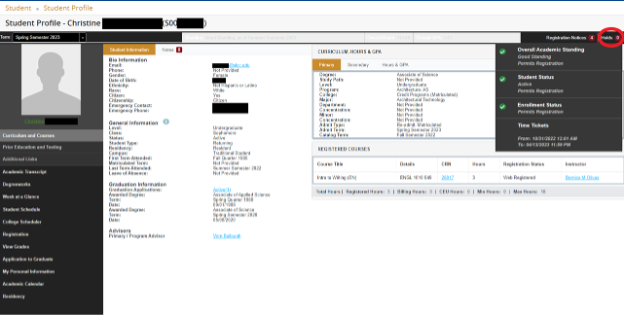
- Registration Notices to view academic standing status
- Holds for all other holds except financial aid
- Student Profile (Student View)
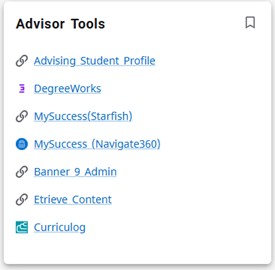
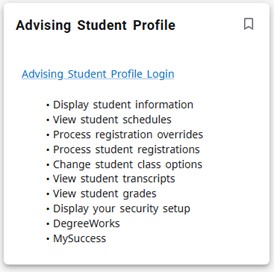
- MySLCC >Advising Student Profile > Advising Student Profile Login > Select the term and enter Student ID, Student Email, or Student Name. Then, click View Profile. Holds are in the top right corner OR
- MySLCC > Student Profile > Student Profile link. Holds are in the top right corner
When there is a notification of a deceased student/employee the first step is to check GUASYST to determine if they have any HR check mark indicators. If there are any HR indicators, then all information is emailed to the HR department at HR@slcc.edu.
If the student is not an employee all information is forwarded to the Office of the Registrar and Academic Records. If you are notified by the deceased's family, please direct them to the Office of the Registrar and Academic Records or Records@slcc.edu.
If available, the document for the deceased (ex: death certificate or obituary) should also be brought or sent to the Office of the Registrar and Academic Records.
The Office of the Registrar will contact all other necessary departments.
Definitions:
- Duplicate Record - One student/person with two record identification numbers (S numbers). These errors are a result of application typos, incomplete information, personal information changes including unreported name changes, and both programming and human processing errors.
- Merged Record - Two students/persons with one record identification number (S number). These errors happen there is a significant amount in common (such as twins with similar names and the same birth date, mailing address and emergency contact)
For duplicates, determine if both records are for the same student/person by verifying ALL information (active or inactive) on both records. For example:
- Full Name (Legal or any other names that may be on an account here at SLCC) on both SIDs
- Date of birth for both SIDs
- Any additional information like current and past mailing addresses, phone, or email for each
*Please contact Records and Data Management or send an email to duplicates@slcc.edu with detailed information. Include why you determined this student has two records (SIDs) or that we have a potentially merged record for two different students.
Academic Concerns - Concerns that have to do with the delivery of the course from the academic side. This would include issues with the professor, issues with content, delivery of content, long-term technology issues etc. Anything that happens in the classroom that could impede a student’s ability to be successful.
Types of Enrollment Exceptions
- Adding Course to Student Registration
- Section Change
- Credit Change
- Credit changes can be made anytime during the semester.
- A credit change for a previous semester can be granted only if the request is for one previous semester
- Withdrawal
- Administrative Drop
- Last Date of Attendance (LDA) is required when dropping or withdrawing students.
- If student was awarded financial aid (see TSAAREV for term activity), make sure you notify a student before making the change.
Instructions for Students (Current)
- Student submits Enrollment Exception form found in the Student Forms card in MySLCC.
- Instructor approves the request.
- Then, the Academic department (Dean/Chair/Coordinator/Admin) approves the request.
- Finally, the request form is sent to the Office of the Registrar and Academic Records for processing.
It is recommended that students contact their instructor before submitting the Enrollment Exception request. For questions regarding the process, contact Registration@slcc.edu.
Rules
- Enrollment Exceptions are only requested/processed outside an active add/drop/withdrawal period for the current term. Students requesting audit (AU) to credit (RX) may submit in the current or prior term.
- SLCC, as an institution, does not drop students for non-attendance. However, if a student does not attend a class all semester, they may submit a Non-Attendance Appeal. For more information and instructions, please see the Non-Attendance Appeal page.
- For personal issues outside of the classroom, please see the Registration Appeals for a list of extenuating circumstance and instructions.
Frequently Asked Questions
- What if the student has an issue/problem with the Instructor?
- Have them go straight to the Academic Department.
- What if the student is an athlete requesting an enrollment exceptions?
- There is a separate form for the student athletes. Contact the Assistant Coach to submit.
- What if the student was awarded financial aid and is requesting a drop, withdrawal, or credit change?
- Students are encouraged to first meet with a Financial Aid Advisor to discuss potential changes in registration.
GED Certificates and Test Scores should be ordered from your state GED website. These orders are sent to Salt Lake Community College via Parchment Exchange Services and are processed in 1-3 business days (may be longer during peak seasons).
Official high school transcripts may be sent using the following methods:
- Via email HighSchoolTranscripts@slcc.edu from a school district email account. (Transcripts received from a personal email account will not be accepted as official)
- For student-athletes, official high school transcripts can be sent to AthleticRecords@slcc.edu
- Via mail
Office of the Registrar and Academic Records
PO Box 30808
Salt Lake City, UT 84130-0808
- Via electronic exchange services: Parchment, MyCE, and Moveit.
High School transcripts/diplomas/GEDs will be processed, upon receipt, within 1-3 business days (may be longer during peak seasons).
- Change of Personal Information webpage
- For changes to a student's Name, Social Security Number, Marital Status, Birth Date, Gender, Legal Sex, or User ID:
- Students will need to fill out the Personal (legal) Information Change Form (or the Change of Personal Information backup form) and submit it with the required government-issued ID and supporting documentation.
- If all required documentation is not submitted with the form, it will be denied, and the student will have to submit a new request.
- Approved government currently issued id:
- State ID or Driver's License
- Passport
- US Military ID
- Approved Supporting Documentation:
- Name Changes
- Birth Certificate
- Court Order (May use previous or current State Driver's License in lieu of court order)
- Marriage License/Certificate
- Passport
- Permanent Visa
- Social Security Card
- Social Security Number
- Signed Social Security Card
- Individual Taxpayer Identification Number (ITIN): ITIN Authorization Letter
- Marital Status
- Marriage License/Certificate
- Divorce Decree (Court Documents)
- Court Order (Name Change Order)
- Date of Birth
- Birth Certificate
- Passport
- Permanent Visa
- State ID or Driver's License
- Legal Sex Change
- Court Order (May use previous or current State Driver's License in lieu of court order)
- State ID or Driver's License
- Gender Update
- No additional documents except government issued id
- User ID changes - Students' user IDs are updated through the Help Desk and they cannot be registered for any classes at the time of the request. Students will have to wait for their request to be processed before registering for classes.
- All SLCC employees must go through Human Resources to make any personal information changes.
- Name Changes
- For Preferred Name and Personal Pronoun Information
- For changes to a student's Mailing Address, Phone, or Email go to:
- MySLCC > My Profile card > My Profile > Personal Information
- For changes to the Emergency Contact Information go to:
- MySLCC > My Profile card > Update Emergency Contact
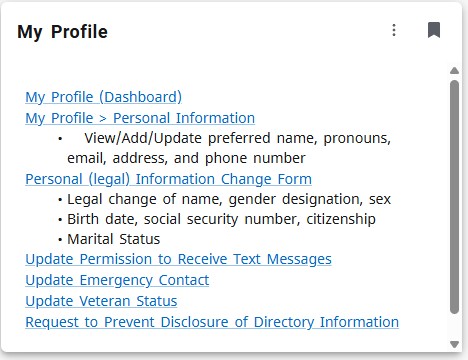
A student may prevent directory information from being disclosed by completing a Request to Prevent Disclosure of Directory Information form and submitting it in person to the Office of the Registrar and Academic Records. (The Disclosure Form Agreement remains so until revoked by the student.)
Request Form: Prevent Directory Information Disclosure
- Declaring and Changing Your Program of Study
- SLCC Policy on Curriculum (Programs) and Graduation Standards
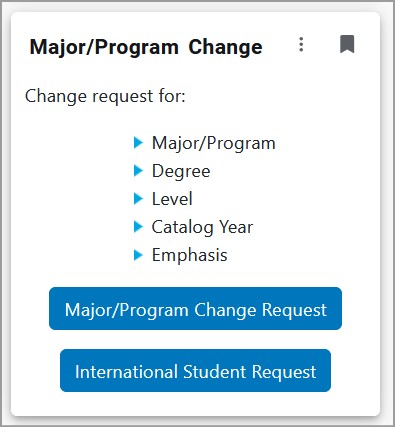
Student Online Change Requests:
MySLCC > Major Change > Major Change Request
For International Students:
MySLCC > Major Change > International Student Request
Advisor Change Request for Program of Study Exceptions
MySLCC > Advisor Forms > Major Change Exception
- SLCC Guidelines for Releasing Student Information
- FERPA Proxy – Creates a dashboard where the proxy can see the student’s information that the student has given them permission to see.
- For instructions on how to set that up, see the FERPA webpage.
- If the student would like their Proxy to be able to call and speak to staff about their student record, then they will need to create a Passphrase for the Proxy to use when speaking to staff.
For changes to veteran status and/or SB45 veteran audit requests, fill out and submit the Update Veteran Status form with approved documentation attached.
Approved documents are:
- Active Military ID card
- Veteran ID card
- DD214 with Government Issued Photo ID (Driver’s License, State ID, or Passport)
If the student selects to opt-in to the SB45 Veteran Audit, their major/degree will be changed to General Studies-Personal Interest (GS-PI) and course registration status will be updated to Audit per the requirements set by Utah Senate Bill 45.
MySLCC > My Profile card > Update Veteran Status
*For additional information about the SB45 Veteran Audit, please contact Veteran Services.